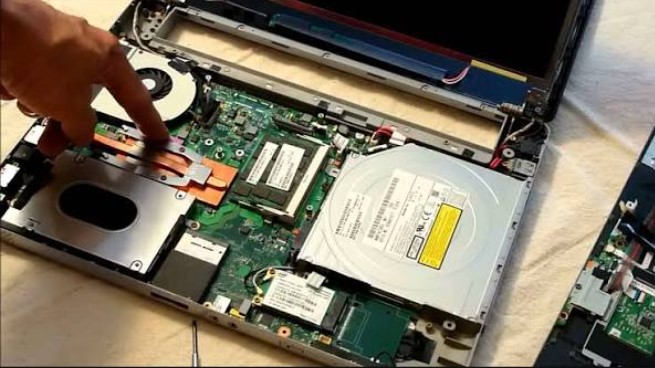
At RepairKE, we provide HP Laptop Upgrade Service focused on compatibility, careful installation, testing and practical recommendations. Whether your HP laptop needs a RAM upgrade, SSD replacement, additional storage, battery replacement or a general performance assessment, we can help identify the appropriate service for your machine.
Is your HP laptop becoming slow, taking too long to start, running out of storage space, or struggling with demanding applications? You may not need to replace the entire computer. A carefully selected HP Laptop Upgrade Service can improve performance, increase storage capacity, extend the useful life of your laptop, and make everyday computing more convenient.
At RepairKE, we provide professional HP laptop upgrade solutions for users who want to improve the performance and functionality of their existing machines. Depending on the HP laptop model, specifications, age, and upgrade compatibility, we can assess the device and recommend suitable hardware upgrades.
“A slow laptop does not always need to be replaced. In many cases, the right hardware upgrade can give an older computer a new lease on life.”
What Is an HP Laptop Upgrade Service?
An HP laptop upgrade service involves assessing a laptop's current hardware and identifying components that can be upgraded or replaced to improve its performance or functionality.
Common upgrades include RAM upgrades, SSD upgrades, hard drive replacement, storage expansion, and battery replacement. Some HP laptops also support additional hardware improvements depending on their specific design.
Because HP produces many laptop models with different internal configurations, an upgrade should not be based solely on the laptop's brand. The exact model number, motherboard configuration, existing components, available slots, and supported specifications need to be considered before purchasing replacement hardware.
At RepairKE, we can inspect your HP laptop and determine which upgrade options are appropriate for the particular model.
Common HP Laptop Upgrade Issues and Solutions
| No. | Common Fault / Issue | Symptoms | Repair / Solution / Service Available |
|---|---|---|---|
| 1 | Slow laptop performance | Applications take long to open; system freezes | RAM upgrade, SSD upgrade and performance assessment |
| 2 | Insufficient RAM | Multitasking becomes difficult | Compatible RAM upgrade |
| 3 | Slow mechanical hard drive | Long startup and loading times | HDD-to-SSD upgrade |
| 4 | Limited storage space | “Disk full” warnings | Larger SSD/HDD installation |
| 5 | Failing hard drive | Errors, crashes or missing files | Drive replacement and operating-system installation |
| 6 | Battery deterioration | Short battery life or unexpected shutdowns | Compatible battery replacement |
| 7 | Slow boot time | Laptop takes several minutes to start | SSD upgrade and system optimization |
| 8 | Application lag | Programs become unresponsive | RAM/storage upgrade and software assessment |
| 9 | Overheating and performance throttling | Laptop slows down when working | Internal cleaning and cooling-system service |
| 10 | Outdated hardware configuration | Newer software performs poorly | Hardware assessment and suitable component upgrades |
1. Slow HP Laptop Performance
A slow HP laptop can make even simple tasks frustrating. Delayed startup, slow application loading, browser lag and frequent freezing can result from several factors.
Insufficient RAM, an older mechanical hard drive, excessive background programs, storage problems, overheating and an aging operating system can all contribute to poor performance.
Solutions Offered
RepairKE can assess the laptop to identify the likely cause of the slowdown. Depending on the results, solutions may include:
-
RAM upgrade
-
SSD installation
-
Hard-drive replacement
-
Storage expansion
-
Internal cleaning
-
Cooling-system inspection
-
Operating-system optimization
-
General hardware assessment
“The right upgrade starts with diagnosis. Installing a larger component does not necessarily solve a performance problem if the actual bottleneck is somewhere else.”
2. HP Laptop RAM Upgrade
RAM, or Random Access Memory, helps your laptop handle applications and multiple tasks at the same time. When an HP laptop has limited RAM, users may experience slowdowns when running several browser tabs or applications simultaneously.
A RAM upgrade for an HP laptop can increase the amount of available working memory, provided the laptop supports additional or higher-capacity memory.
Solutions Offered
Our RAM upgrade service can include:
-
Checking the existing RAM capacity
-
Identifying the supported memory type
-
Checking available RAM slots
-
Installing compatible RAM
-
Testing the laptop after installation
-
Verifying that the new memory is recognized correctly
The exact upgrade capacity depends on the HP laptop model.
3. HP Laptop HDD to SSD Upgrade
Older HP laptops commonly use mechanical hard disk drives. Compared with modern solid-state drives, HDDs generally have slower access speeds and moving mechanical components.
Replacing a compatible HDD with an SSD can significantly improve startup times, application loading and general system responsiveness.
Solutions Offered
RepairKE can assist with:
-
SSD compatibility assessment
-
SSD installation
-
Operating-system installation or migration
-
Data transfer where appropriate
-
Drive testing
-
Boot configuration
-
Performance checks after installation
An SSD upgrade is one of the common ways to modernize an older compatible HP laptop.
4. HP Laptop Storage Upgrade
Running out of storage can become a problem when a laptop contains large documents, photos, videos, applications and other files.
A storage upgrade can provide additional space and help prevent the system from operating with an unnecessarily full drive.
Solutions Offered
Depending on the laptop, we can assess options such as:
-
Installing a larger SSD
-
Replacing an existing storage drive
-
Upgrading from a smaller SSD to a larger SSD
-
Transferring data to a replacement drive
-
Installing an operating system on the new drive
-
Checking drive health
Before replacing a storage device, important files should be backed up whenever possible.
5. Failing or Damaged Hard Drive
A failing storage drive may produce warning signs such as frequent crashes, unusual noises in the case of mechanical drives, corrupted files, slow performance, boot errors or disappearing data.
Continuing to use a failing drive can increase the risk of data loss.
Solutions Offered
RepairKE can assess the storage device and determine whether replacement is appropriate. Where practical, we can assist with data migration to a new compatible drive.
If valuable data is inaccessible, the situation may require specialized data-recovery services rather than ordinary laptop repair.
6. HP Laptop Battery Replacement
Laptop batteries naturally lose capacity over time. A battery that once lasted several hours may eventually provide only a short period of operation.
Other symptoms can include unexpected shutdowns, failure to hold charge or a battery that is no longer detected correctly.
Solutions Offered
Our battery service can include:
-
Battery condition assessment
-
Battery compatibility checking
-
Replacement of the battery with a suitable unit
-
Charging-system checks
-
Post-installation testing
If a battery is swollen, damaged or physically deformed, it should be handled carefully and replaced rather than continued in use.
“Battery performance is part of laptop usability. A powerful computer is less convenient when its battery can no longer support normal mobile use.”
7. Slow HP Laptop Startup
Long startup times can have multiple causes. An older hard drive, excessive startup applications, insufficient resources, operating-system problems or storage issues may contribute.
Solutions Offered
RepairKE can investigate slow boot performance and recommend an appropriate solution. Depending on the diagnosis, this may involve an SSD upgrade, startup optimization, operating-system service or hardware replacement.
8. HP Laptop Application Lag
If applications frequently freeze or take a long time to respond, the laptop may not have sufficient resources for the user's workload.
For example, users working with large spreadsheets, design software, development tools, multimedia applications or multiple browser windows may benefit from additional RAM or faster storage.
Solutions Offered
We can assess:
-
Available RAM
-
Storage performance
-
Processor limitations
-
System resource usage
-
Operating-system condition
-
Cooling performance
An appropriate upgrade can then be recommended based on the laptop's capabilities and intended use.
9. HP Laptop Overheating
Overheating can cause a laptop to reduce processor performance in an attempt to control temperatures. This can make the computer appear slower during intensive tasks.
Dust accumulation, restricted airflow, cooling-fan problems or degraded thermal material can contribute to overheating.
Solutions Offered
RepairKE can provide:
-
Internal cleaning
-
Cooling-system inspection
-
Fan inspection
-
Thermal-service assessment
-
Airflow checks
-
Performance testing
Cooling problems should be addressed alongside hardware upgrades where necessary.
10. Outdated HP Laptop Hardware
As software becomes more demanding, an older laptop may struggle to meet the requirements of newer applications.
Rather than immediately replacing the entire computer, users can have the hardware assessed to determine whether upgrading selected components is practical.
Solutions Offered
RepairKE can evaluate the laptop's:
-
RAM
-
Storage
-
Battery
-
Cooling system
-
Operating-system configuration
-
General hardware condition
We then identify upgrade possibilities that are compatible with the specific HP model.
Why Choose RepairKE for HP Laptop Upgrades?
Choosing the correct component is important because not every RAM module, SSD or battery will work with every HP laptop. RepairKE focuses on compatibility, proper installation and testing.
10 Reasons to Choose Us
1. HP Laptop Upgrade Expertise
We focus on laptop hardware assessment and upgrade services, helping customers identify practical ways to improve their computers.
2. Model-Specific Assessment
Different HP laptops have different upgrade capabilities. We assess the specific machine rather than assuming that every HP laptop can receive the same upgrade.
3. RAM Upgrade Services
We provide compatible RAM upgrade solutions for HP laptops that support memory upgrades.
4. SSD Upgrade Services
We can help customers replace older or slower storage with compatible SSD solutions.
5. Storage Expansion
Where supported, we can help increase laptop storage capacity for users who need additional space.
6. Professional Installation
Hardware components need to be installed carefully. Our service includes proper installation and testing.
7. Performance-Focused Solutions
We consider the symptoms and intended use of the laptop before recommending an upgrade.
8. Support for Different HP Models
HP has a wide range of laptops, including different generations and configurations. We assess the particular model before recommending compatible components.
9. Testing After Upgrades
After installing hardware, the laptop can be checked to ensure the new component is recognized and functioning correctly.
10. Practical Upgrade Advice
Our goal is to help customers understand what their laptops need rather than automatically recommending unnecessary replacements.
“Good laptop servicing is not simply about replacing parts; it is about matching the right component to the machine and the user's actual requirements.”
HP Laptop Upgrade Service for Different Users
An HP laptop upgrade can be useful for different types of users.
Students
Students may benefit from faster storage and additional RAM for research, online learning, documents and multitasking.
Office Users
Professionals working with office applications, email, spreadsheets and web-based systems may benefit from a more responsive computer.
Business Owners
Upgrading existing laptops can sometimes extend the useful life of business equipment and reduce the immediate need for replacement.
Creative Professionals
Users working with demanding design, photography, video or other resource-intensive applications should have the laptop assessed carefully to determine whether its hardware can support the required workload.
Home Users
A storage or performance upgrade can make everyday browsing, document work and entertainment more convenient.
Frequently Asked Questions About HP Laptop Upgrades
1. Can every HP laptop be upgraded?
No. Upgrade options vary by model. Some HP laptops have replaceable RAM and storage, while others have components that are limited or soldered to the motherboard.
2. How do I know if my HP laptop needs more RAM?
If your laptop becomes slow when several applications or browser tabs are open, limited RAM may be one possible cause. A hardware assessment can help determine whether a RAM upgrade is appropriate.
3. Can I upgrade my HP laptop from HDD to SSD?
Many HP laptops with compatible interfaces can be upgraded from an HDD to an SSD. The exact SSD type and installation method depend on the laptop model.
4. Will an SSD make my HP laptop faster?
An SSD can significantly improve storage-related responsiveness compared with many traditional mechanical hard drives. However, overall performance also depends on the processor, RAM, operating system and other components.
5. How much RAM can my HP laptop support?
The maximum supported RAM depends on the specific HP model and motherboard configuration. It is important to verify the manufacturer's specifications before purchasing memory.
6. Can you upgrade my HP laptop storage?
Depending on the model, storage may be replaceable or expandable. RepairKE can assess the available storage configuration and recommend compatible options.
7. Should I upgrade my laptop or buy a new one?
The appropriate choice depends on the laptop's age, condition, specifications, upgradeability and intended workload. A professional assessment can help establish what upgrades are technically practical.
8. Can you transfer my files when upgrading the storage drive?
Data migration may be possible when replacing a storage drive, provided the original drive is functioning and the required data can be accessed. Important files should always be backed up.
9. Can an HP laptop battery be replaced?
Many HP laptops have replaceable batteries, although the design varies by model. Battery compatibility should be confirmed before replacement.
10. How do I request an HP Laptop Upgrade Service from RepairKE?
Contact RepairKE with your HP laptop model and describe the performance or storage problem you are experiencing. The laptop can then be assessed to determine suitable upgrade options.
Upgrade Your HP Laptop with RepairKE
A slow or outdated HP laptop does not necessarily mean that the entire machine needs to be replaced. In suitable models, upgrading RAM, SSD storage, battery or other compatible components can improve usability and extend the laptop's practical service life.If your HP laptop is slow, running out of storage, experiencing battery problems or struggling with modern applications, contact RepairKE for an assessment and discuss the available upgrade options for your specific model.
HP Laptop Upgrade Service
HP laptop upgrade in Nairobi, HP laptop RAM upgrade, HP SSD upgrade, HP laptop storage upgrade, HP laptop repair, laptop performance upgrade, HP laptop battery replacement, HP computer upgrade service.